
Transaction Cost and Granular Rate-Limiting
What if I told you that you can track the Cost and Token utilization for Every Open AI Request your end users make?
Nice, Right?
Well, what if I also said that you’d be able to create custom spending limits for your Users / Business Groups and Rate Limit them BEFORE they exceeded their spending limit?
Now you can wiiiiiith…
The Amazing Cost-Tracking and Spend-Limiter Architectural Design Pattern Solution!!!
TA-DA!
Hmmm, it doesn’t exactly roll of the tongue, does it? Ok I’ll stick with…
The Open AI Cost Gateway Pattern
GitHub Repo : Open AI Cost Gateway Pattern Repo
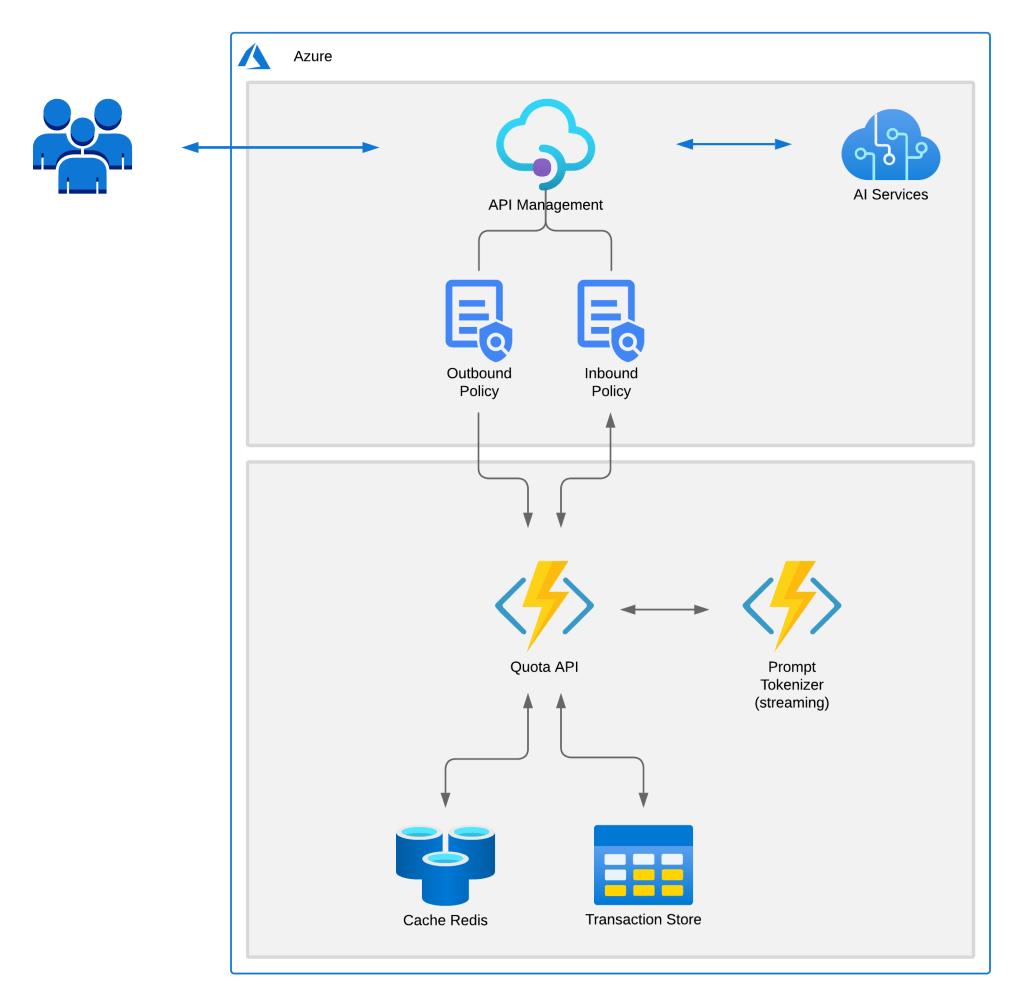
But HOW does it work?
I’m glad you asked, that’s the beauty it leverages the PaaS service API Management (APIM) and its highly scalable Built-In functionality: Policies , Products & Named Values
API Management let’s us hide the Service Endpoint and Key needed to utilize the Azure Open AI service. The user sends a Post Request to the API hosted in APIM with a Product Subscription Key in the header,
The Inbound Request Policy ensures that the user has a spend remaining > $0, If they don’t, they receive a 429 Rate Limited message. If they do, the request continues to the Open API Service.
The Outbound Response Policy, captures the total amount of Tokens used and the model, calculates the cost and decrements the amount of spend remaining.
It ALSO works with STREAMING requests! The Prompt Tokenizer Python Function App uses Tiktoken Open Source BPE Tokenizer to calculate the Prompt Tokens.
*I am working with the PG to have the Prompt Tokens added to the payload so Stay Tuned, we might have some good news coming on that front soon!
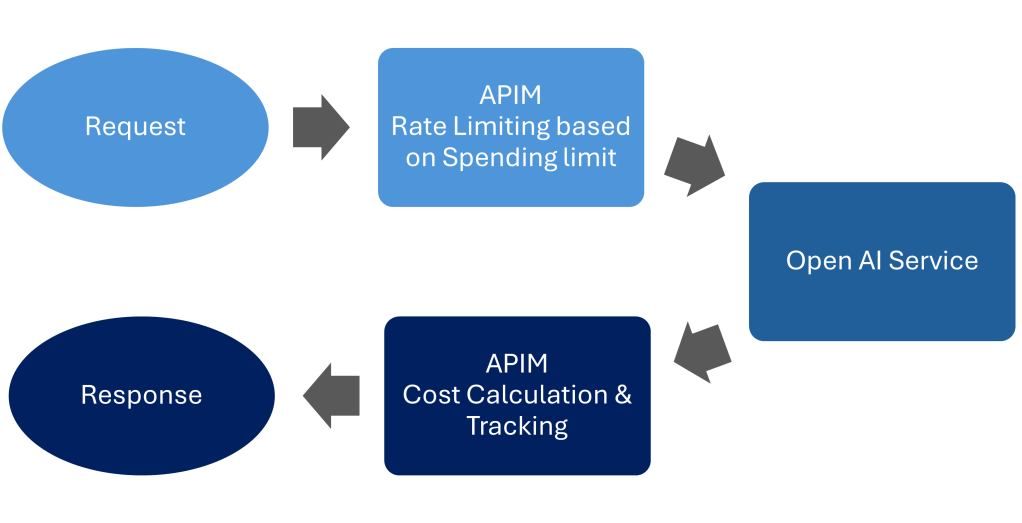
It starts with a Product
Each User/Group get their own Product. Products allow us to correlate Users and functionality in a nice little package. We can designate separate backend services per product, insert policy snippets and also leverage Subscription Keys, which we can use to track the spend and apply rate-limits!
Policies
Policy Fragments, to be precise. Modular units of functionality that allow us to utilize only the features we want to include and at the Scope that we want them to run. Essentially, you can choose to either Log, Track Cost, and/or rate limit some of your users and not others. or you can apply the functionality to all, with scopes, you get to choose (Link).
A Prescription for success
I created a IaC Terraform Script that generates all the resources used in this solution. If you have any questions or need any assistance, please feel free to contact me. Feel free to use this however you like but if you find it useful, drop me a line and let me know.
Have Fun!
Special Thanks!
To Julia Kasper for including my humble design pattern in this great Tech Community Blog article
 The Preston Verse
Pingback: Weekly Update 11 September 2023 – Weekly Microsoft 365 Dev Update 11 September 2023 – Outlook REST API Decom, OpenAI Costing &more | The thoughtstuff Blog
Thank you for your feedback!
LikeLike
Pingback: Azure Open AI Cost Management – Albandrod's Memory